How to deal with whitespaces in the Eclipse IDE

Whatever your project’s specific policy on whitespaces is (tabs vs. spaces, etc), the most important rule should always be consistency. Not just to make your code look nice, but also to avoid issues with patches and your version control system. Changes to whitespaces may be more or less invisible to the naked eye, but Git and co. register them anyway.
Here are some simple ways to automate how you deal with whitespaces in Eclipse.
First, if you don’t want to have trailing spaces in your java code (why would you), you can remove them automatically:
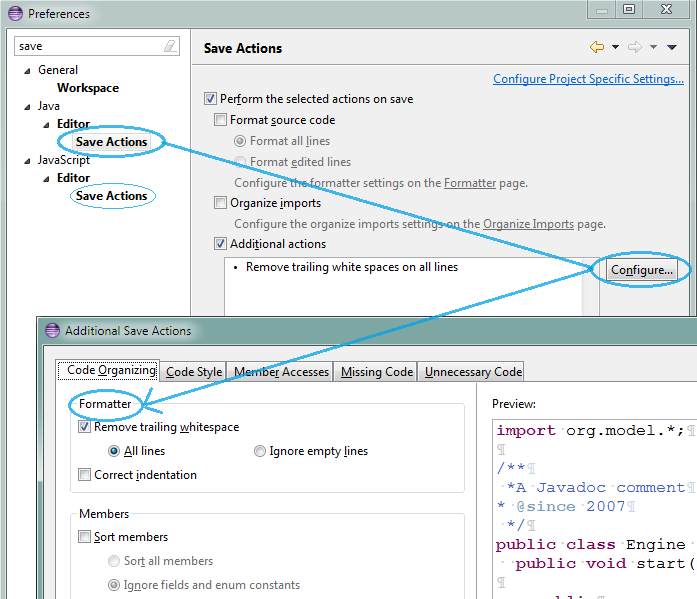 If you use JSDT, there also is an option available to turn this feature on for javascript.
Second, if you want to be sure not to miss any unwanted whitespaces, you can configure Eclipse to show them as characters. Since doing this for all whitespaces can make the code harder to read, you can choose to show only those you don’t want to have in your code:
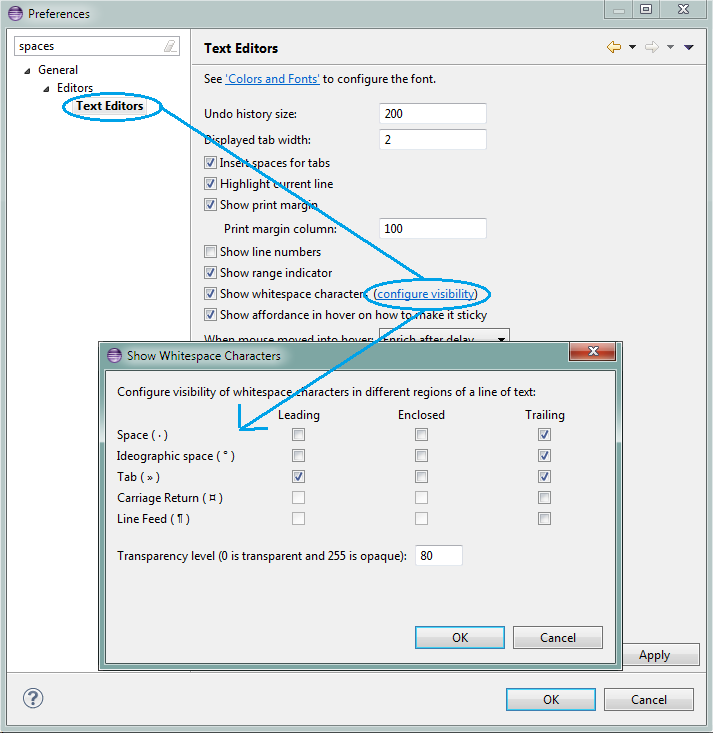 This setting affects all text files, including java, javascript and HTML. Sadly, there is no option yet that shows only two or more enclosed spaces.
