Eclipse Yoxos Services Downloads Blogs About
Home > Blogs >

on May 29th, 2009PDE’s Automated Management of Dependencies

I have been working with the upcoming Equinox OSGi book authors quite a bit as of late. They are a demanding bunch, but they have helped me improve PDE’s OSGi tooling while they write and exercise parts of PDE that not many people know about. In particular, the book uses something in PDE called Automated Management of Dependencies (AMD). What’s that? Well, have you ever noticed this collapsed section in the PDE editor:

amd1 300x207 PDEs Automated Management of Dependencies

Let’s take a peak!

amd2 300x241 PDEs Automated Management of Dependencies

This section of the manifest editor was built for people who have different bundle development workflow. At Eclipse, we have traditionally done a manifest-first workflow where users are responsible for crafting their whole manifest. I personally believe this is the best workflow for advanced users. However, for new users, it’s very cumbersome to specify your dependencies. For example, if I want to use some JFace Databinding code, how do I know what bundles or packages I need to specify? Well, AMD was built to address this concern. The first step to using AMD, is to add the bundles that PDE will consider to when generating your dependencies (we call this the secondary classpath). The easiest thing you can do is add all the bundles as part of your target (although this isn’t always optimal):

amd3 300x240 PDEs Automated Management of Dependencies

Ok, now that we have added all the bundles that PDE will consider when generating the dependencies, we need to select what type of dependencies PDE should generate. In this case, we choose Import-Package, but you can as easily choose Require-Bundle if that was your preference. To test the AMD functionality out, we will remove all of our current dependency statements, which will result in a bunch of compile errors in our project:
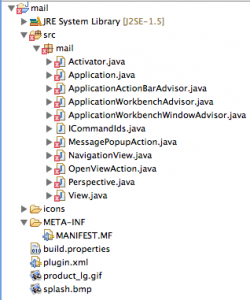
amd4 250x300 PDEs Automated Management of Dependencies

So now, we can either click the analyze dependencies button in the AMD section of the editor… or we can simply launch our application and the dependencies will be automatically calculated. To verify, let’s look at our manifest:
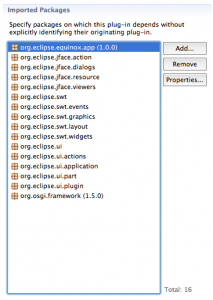
amd5 213x300 PDEs Automated Management of Dependencies

Wow, magic! PDE analyzed the code and calculated the dependencies so you didn’t have to think about it.

This works great, however, not everything is perfect yet… there are a couple bits missing. If you noticed, the version ranges weren’t properly calculated on the dependencies. This is a hard problem and we are currently exploring it in the PDE API Tools project. It is also a bit cumbersome to add things to your secondary classpath… should the default be that we look at everything in your target? Should PDE look at using something like BND to do the dependency calculation? Should we allow people to somehow scope the bundles in advanced… while creating a new project? If you’re interested in this functionality, please let me know. The PDE team plans to explore and improve AMD in the next release cycle, so please comment if you have ideas. You can also file bugs and feature requests against PDE.

I’ve also created a quick video which shows AMD usage with the RCP mail example.

Enjoy.

Related posts:

10 Responses to “PDE’s Automated Management of Dependencies”

  1. ekke says:

    chris,
    I used this sometimes if I know the required bundle(s) to avoid error markers and easy of development.
    then if I’m ready I calculated the imported packages, because I always try to use imported package dependencies.
    this PDE feature is very helpful if using package-imports.
    ekke

  2. I will consider this on my next project that I work on. It is normal to kind of fix your PDE target, and so it would be nice to setup your secondary classpath and then let the PDE handle it from there. Still it would be even nicer if you could specify this as a workspace wide setting. One that your Plugin project could use as a default and then allow the user to override it as they wish per project.

    In fact if used as a workspace wide setting (as you do in setting your PDE target), I could see using this most of the time. I mean this could be really nice if you could set it up to add that dependency to the manifest in the same way you get your import statement added when you specify a type in the Java editor.

  3. If the both of you have any ideas on how to improve the current functionality, let me know.

    The only drawback is having everything on your secondary classpath if you want your whole target included. This could be a potential cause of some performance problems if your classpath is gigantic.

  4. Steven Dick says:

    My team made extensive use of this feature early on but now we don’t recommend anyone to use it. Up to and including Eclipse 3.4.2 it can hide missing Import-Package entries because the Eclipse IDE uses the list of bundles for import resolution and not just the imported packages and required bundles.

    You find out you’ve missed the ‘real’ dependencies when you do a headless build. Even if it did work, it’s only a partial solution if you use XML-based configuration such as Spring (which we do).

    I find the quick-fix in the Java editor for adding missing Import-Package entries much more useful.

  5. Steven, can you be a bit more specific about what you mean by “real dependencies”

    In Eclipse 3.5, we improved AMD a bit. Are you referring to indirect dependencies? There are types of dependencies that are difficult to calculate at development time and of course, it’s dependent on a bundle being available in your target.

    The more specific you are with your problems, the easier it is for me to find areas where we can improve in the next release of Eclipse.

    Thanks Steven.

  6. Steven Dick says:

    My experience was Eclipse was using the bundles from the ‘automated management’ list as well as the MANIFEST.MF Import-Pacakge entries to resolve imports/dependencies. This meant developers missed adding the packages to the Import-Package list until a failed nightly build told them about the missing dependencies.

    This became obvious if the developer removed the ‘automated management’ list of bundles and then they’d see errors across the project for unknown types and packages. It’s for this reason we recommend our developers not to use the feature.

  7. Gergo says:

    I’ve found another use of this: adding extra dependencies to the environment for without including them in the product.
    Example: main sources and tests live in the same plugin project, but the latter aren’t deployed/exported, yet have extra dependencies.
    I can build&run the tests from Eclipse, but they don’t appear in the Manifest – and that’s good.

    Is this OK?
    Did I miss something? is there a nicer/easier way to achieve the same effect? (without the need to split all plugins to a main and a -test one with different dependencies)
    Thanks in advance!

  8. Yes Gergo, that is possible.

    However, the general approach used in Eclipse land has been to split things up into separate bundles. This has the extra benefit of seeing your API from the consumers point of view. If you need test internal code, people generally use fragments to achieve this. You can also deploy these test bundles in environments to do tests.

    In the end, both approaches end up having a configuration issue. If you do your approach, you have to ensure that the test code doesn’t end up exported as part of the bundle. In the latter approach, you have the same problem but at least the test code is contained in another bundle.

  9. Gergo says:

    Thanks, Chris.
    I suspected it would be in a way nicer to bundle tests separately, but converting that in our current project could be too expensive(with around 100 projects).
    Also:
    1) using fragments: we have had some obscure errors (like ClassNotFoundExceptions) when running the product, which we suspected were caused by fragments
    2) the splitting would double the number of bundles, resulting in around 200 sub directories.
    3) it would be much more expensive to add the first unit test to plugin: setting up a new fragment project and eveything (instead of just “New Junit class”). Maybe this should be automated by, perhaps as an extension to the current wizard? (Ideally just a tick box “do you want to create a test fragment for this?”)

    From a level higher: now there is a 1-to-1 mapping from plugin projects to bundles (actually more, if you build source bundles?). It would be great if I the single project which can build both test and runtime configurations – ie. multiple bundles/fragments if needed.

  10. Stefan Baramov says:

    A few suggestion for the PDE team:

    - A compare tool for manifest files. By specification manifest files are limited to 72 characters per line. Thus some tools such as BND generate really unreadable text. It would be nice if PDE has a compare tool that allows to compare two version of a manifest file in a nice structured way

    - an extension point to allow 3rd party to plug-in dependency resolution for additional files such as spring context files.

    - a validator that analyzes the “secondary classpath” and the Import-Package section (if you use import package rather the required bundles) and warn the user about possible problems and inconsistencies.

    Finally, it is not quite practical to run the dependency analyze against the complete target, especially if you have a large target. Notable example would be if one is developing extensions for WTP. In this case are talking about a target with possibly 700+ bundles. So a “smart” tool should somehow figure out how to reduce the number of analyzed bundles. This could be quite impossible.

© EclipseSource 2008 - 2011