Ian is an Eclipse committer and EclipseSource Distinguished Engineer with a passion for developer productivity.
He leads the J2V8 project and has served on several …

With just over one week until Eclipse Mars ships, I’ve been counting down the Eclipse Features I’m most excited about.
Recently I’ve been working on JNI bindings for V8 to bring the V8 API to Java. Throughout this project I used the CDT for the C/C++ work and the JDT for the Java work. Because of this, I’m very happy to see improvements to the CDT and in particular, the CDT Launching. Eclipse Mars has an optional Launch Bar to make it really easy to launch your projects either on the local machine or on a remote device.
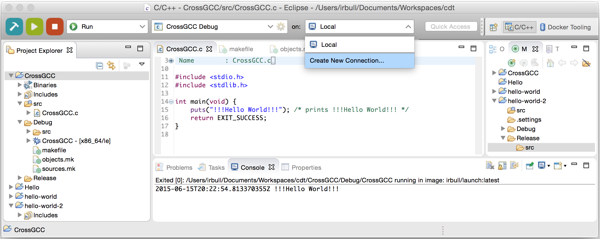
You can choose the configuration you wish to run (release or debug), the application to launch and the device to launch the application on. Doug Schaefer described how he used the Launch Bar to deploy directly to an Arduino.
 In order to use the Launch Bar, you first need to install it from the Eclipse Mars Repository.
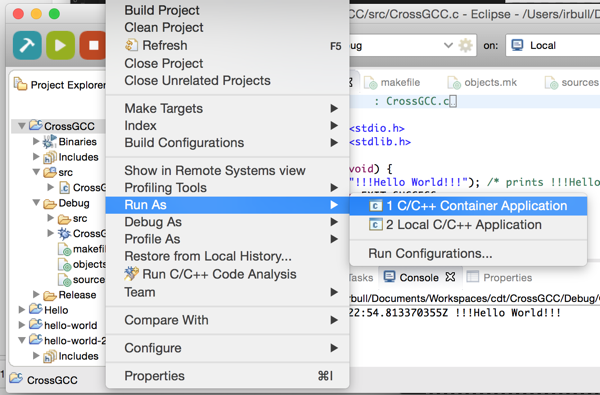
The CDT also added support for direct Docker deployment. This means that you can deploy your C/C++ applications from Eclipse directly to a docker container.
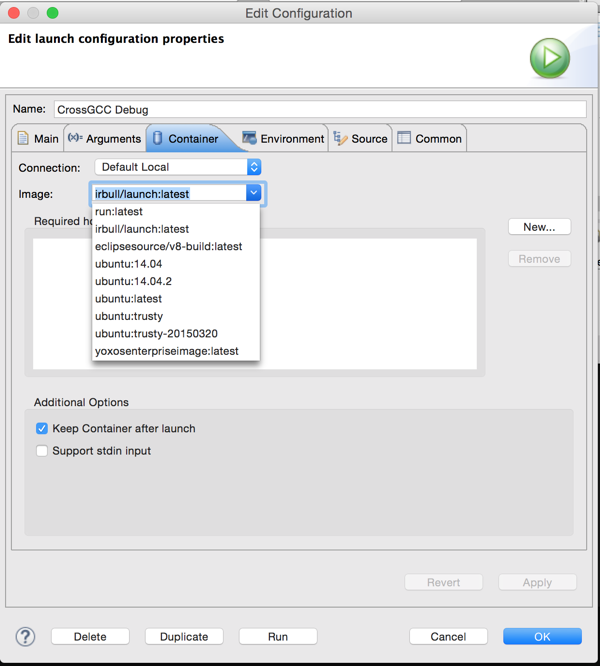
You can configure which image to use as well as any directories from the host that should be copied to the container.
For more CDT news, checkout their New and Noteworthy. For more Eclipse Tips & Tricks, follow me on Twitter.

Ian is an Eclipse committer and EclipseSource Distinguished Engineer with a passion for developer productivity.
He leads the J2V8 project and has served on several …