


Jonas Helming, Maximilian Koegel and Philip Langer co-lead EclipseSource, specializing in consulting and engineering innovative, customized tools and IDEs, with a strong …
EMF Validation for Datatype constraints


After defining a model, it is a common next step to define validation rules. Often there is a requirement to have attributes with a restricted length or attributes with values in a specific range. Furthermore, it can be the case, that there are multiple attributes with the same restriction in different places of the model. To solve such a requirement EMF offers a simple solution: EDataTypes with Annotations.
This is a step-by-step guide how to define your own restricted DataType.
First, you need to define a DataType:

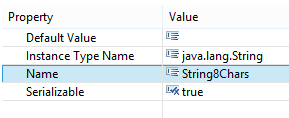
Then the properties of the DataType must be set, this includes the actual Type (the Instance Type Name) and the new Name of the custom DataType:
In the next step, you must define the constraints with an Annotation on the DataType:
In the properties of the Annotation, the source must be set to “https:///org/eclipse/emf/ecore/util/ExtendedMetaData”:

To define the constraints, a Details Entry must be added to the annotation:

You can add multiple Details Entries, if multiple constraints must be set e.g. the lower and upper bounds of a range restriction.
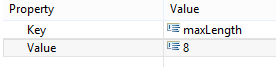
The key of the Details Entry corresponds to the constraint type and the value corresponds to the constraint value:
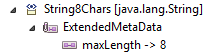
You can now use this definition as an attribute type of any EAttribute in the model:

An attribute with such an AttributeType will automatically provide validation results, e.g. via the Diagnostician. Therefore, frameworks like EMF Forms will automatically evaluate and display them:

You can find the complete list of possible keys in the documentation. Just search for “Facet” and look at the “details key”.
For your convenience, the most important ones are:
pattern: allows to define a regular expression which must be met
totalDigits: allows to define the maximal number of digits of a number
minLength: allows to define the minimal length of a value
maxLength: allows to define the maximal length of a value
minExclusive: allows to define a minimal value which is still invalid
maxExclusive: allows to define a maximal value which is already invalid
minInclusive: allows to define a minimal value which is already valid
maxInclusive: allows to define a maximal value which is still valid
Have fun defining your DataTypes with custom restrictions!