UI.toString() in a snippet
Ever wanted to get a print out of all components that make up a piece of UI?
This little recursive snippet does that for you.
java private void printChildren(Composite composite, int count) { StringBuilder spaces = new StringBuilder(count \* 2); for (int i = 0; i < count \* 2; i++) { spaces.append(' '); } for (Control c : composite.getChildren()) { System.out.println(String.format("%s%s (%s)", spaces.toString(), c.toString(), c.getLayoutData())); if (c instanceof Composite) { printChildren((Composite) c, count + 1); } } }
Here’s an example of the output:
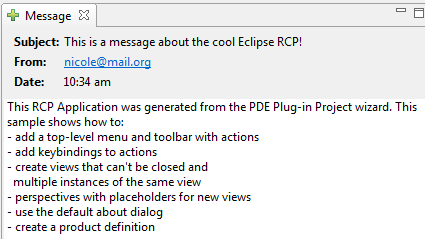
"text"\] Composite {} (null) Composite {} (null) Composite {} (null) Composite {} (GridData {horizontalAlignment=Undefined 256 grabExcessHorizontalSpace=true verticalAlignment=GridData.CENTER}) Label {Subject:} (GridData {horizontalAlignment=SWT.BEGINNING verticalAlignment=GridData.CENTER}) Label {This is a message about the cool Eclipse RCP!} (GridData {horizontalAlignment=SWT.BEGINNING verticalAlignment=GridData.CENTER}) Label {From:} (GridData {horizontalAlignment=SWT.BEGINNING verticalAlignment=GridData.CENTER}) Link {[email protected]} (GridData {horizontalAlignment=SWT.BEGINNING verticalAlignment=GridData.CENTER}) Label {Date:} (GridData {horizontalAlignment=SWT.BEGINNING verticalAlignment=GridData.CENTER}) Label {10:34 am} (GridData {horizontalAlignment=SWT.BEGINNING verticalAlignment=GridData.CENTER}) Text {} (GridData {horizontalAlignment=SWT.FILL grabExcessHorizontalSpace=true verticalAlignment=SWT.FILL grabExcessVerticalSpace=true})