How to structure two dozen Eclipse workspaces

I have tons of Eclipse workspaces. The last time I counted it was around 24, but it actually changes on a daily basis.
With some of my workspaces I want to have a similar IDE as with others, but some IDEs require special plug-ins. A while ago, as I still unzipped Eclipse-downloads, this was a huge pain. Every time I wanted to work in a specific workspace I had to remember which IDE I used for what, then find the workspace location on the disk, before I could do anything.
Permanent workspaces
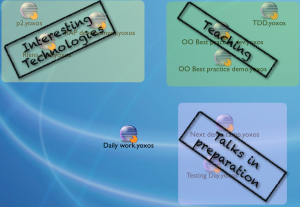
Now I double-click a .yoxos file on my Desktop, then start working. Related .yoxos files hang out together on different areas on my desktop. This is possible with the Yoxos 5 Launcher which I explained in my last blog post.
I associate the workspace I want to start in terms of “upper right” or “vaguely in the middle, left” on the screen. No need to remember long directory names. Remember, a .yoxos file is a definition of both the workspace and the IDE that works on the workspace. The actual workspace is somewhere in my home directory. Since every .yoxos file defines a separate IDE, I always click “Use this as default” after defining the first time where the workspace is located.
Temporary workspaces
Throwaway workspaces go to /tmp. Along with everything else in /tmp, they will be deleted the next time I reboot. The .yoxos file that defines a throwaway workspace should be deleted with it, so this belongs to /tmp as well. The IDE definition works this way:
- Start the Yoxos Launcher
- Add “Project SDK” and all the other desired plug-ins
- Save the .yoxos file to “/tmp/throwaway-workspace” (a new empty directory)
- Hit “Launch”
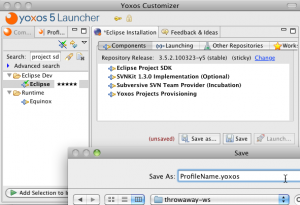 With the bundle pool I don’t worry about the plug-ins that compose the throwaway IDE. Only rarely something new gets downloaded anyway.
.yoxos files and workspaces
A special handling of .yoxos files in otherwise empty directories supports this workflow. If a .yoxos file is is started while residing in an empty directory, the IDE uses this directory as workspace. This provides an easy answer to the question about the “where”, and I use this feature at a regular basis.
On Mac OS X, I can append the extension “.yoxosws” to a directory that contains a .yoxos file. This defines a workspace that I can start directly with a double-click, without bothering about opening a folder to access the .yoxos file.
Conclusion
The Yoxos 5 Launcher makes it simple to handle a multitude of workspaces. The best thing is that you can stop wondering about the IDE contents and start thinking about workspaces. The Launcher provides a consistent UI to define new IDEs, including a huge number of 3rd-party plug-ins that are not shipped with the default Eclipse downloads.
