Ian is an Eclipse committer and EclipseSource Distinguished Engineer with a passion for developer productivity.
He leads the J2V8 project and has served on several …

With Eclipse 3.5 – Galileo – just around the corner, I am counting down the top 10 features I’m most excited about. Number 9 on my list is the improved Java 2 Javascript bridge available in the SWT Browser widget. The SWT Browser now supports both calling Javascript from Java and calling Java from Javascript. Leveraging the growing number of “Web Widgets” (Google maps for example) in your rich client applications is now very easy.
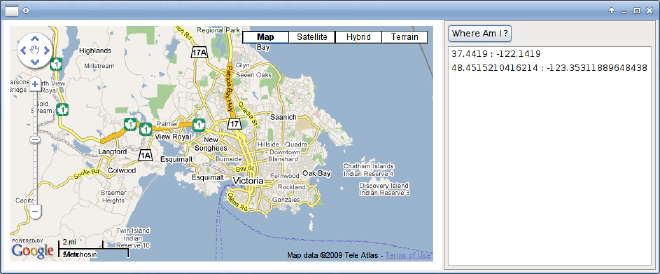
By tightly integrating the contents of the browser with the application, you can properly respond to events and update the UI accordingly. For example, if you resize the window, the map can be resized and Google Maps updates the controls automatically. Also, when you click Where Am I, the location at the center of the map is recorded in an SWT List widget.

The code for this is quite simple and the SWT team has even provided snippet 307 and 308 to help you get started.
Kudos for this feature goes out to Grant Gayed.
The code for my example is below:
package org.eclipse.swt.snippets;

import java.io.File;
import java.io.IOException;

import org.eclipse.swt.SWT;
import org.eclipse.swt.SWTError;
import org.eclipse.swt.browser.Browser;
import org.eclipse.swt.browser.BrowserFunction;
import org.eclipse.swt.custom.SashForm;
import org.eclipse.swt.events.ControlEvent;
import org.eclipse.swt.events.ControlListener;
import org.eclipse.swt.events.SelectionAdapter;
import org.eclipse.swt.events.SelectionEvent;
import org.eclipse.swt.layout.FillLayout;
import org.eclipse.swt.layout.GridData;
import org.eclipse.swt.layout.GridLayout;
import org.eclipse.swt.widgets.Button;
import org.eclipse.swt.widgets.Composite;
import org.eclipse.swt.widgets.Display;
import org.eclipse.swt.widgets.List;
import org.eclipse.swt.widgets.Shell;

public class Snippet308 {

 static List list;
 static Browser browser;
 public static void main(String [] args) throws IOException {
    File f = new File("map.html");
    Display display = new Display();
    final Shell shell = new Shell(display);
    shell.setLayout(new FillLayout());
    SashForm sash = new SashForm(shell, SWT.HORIZONTAL);

    try {
        browser = new Browser(sash, SWT.MOZILLA);
        browser.addControlListener(new ControlListener() {

          public void controlResized(ControlEvent e) {
              browser.execute("document.getElementById('map_canvas').style.width= "+ (browser.getSize().x - 20) + ";");
              browser.execute("document.getElementById('map_canvas').style.height= "+ (browser.getSize().y - 20) + ";");
          }

          public void controlMoved(ControlEvent e) {
          }
        });
    } catch (SWTError e) {
        System.out.println("Could not instantiate Browser: " + e.getMessage());
        display.dispose();
        return;
    }

    new CustomFunction (browser, "theJavaFunction");

    Composite c = new Composite(sash, SWT.BORDER);
    c.setLayout(new GridLayout(1, true));
    Button b = new Button(c, SWT.PUSH);
    list = new List(c, SWT.BORDER | SWT.V_SCROLL | SWT.H_SCROLL);
    list.setLayoutData(new GridData(SWT.FILL, SWT.FILL, true, true));
    b.setText("Where Am I ?");
    b.addSelectionListener(new SelectionAdapter() {
        public void widgetSelected(SelectionEvent e) {
            double lat = ((Double) browser.evaluate("return map.getCenter().lat();")).doubleValue();
            double lng = ((Double) browser.evaluate("return map.getCenter().lng();")).doubleValue();
            list.add(lat + " : " + lng);
        }
    });

    browser.setUrl(f.toURI().toString());
    sash.setWeights(new int[] {4,1});
    shell.open();

    while (!shell.isDisposed()) {
        if (!display.readAndDispatch())
            display.sleep();
    }
    display.dispose();
 }

 static class CustomFunction extends BrowserFunction {
    Browser browser = null;
    CustomFunction (Browser browser, String name) {
        super (browser, name);
        this.browser = browser;
    }
    public Object function (Object[] arguments) {
        double lat = ((Double) arguments[0]).doubleValue();
        double lng = ((Double) arguments[1]).doubleValue();
        list.add(lat + " : " + lng);
        browser.execute("document.getElementById('map_canvas').style.width= "+ (browser.getSize().x - 20) + ";");
        browser.execute("document.getElementById('map_canvas').style.height= "+ (browser.getSize().y - 20) + ";");
        return null;
    }
 }
}

Ian is an Eclipse committer and EclipseSource Distinguished Engineer with a passion for developer productivity.
He leads the J2V8 project and has served on several …