Eclipse Yoxos Services Downloads Blogs About
Home > Blogs >

on May 2nd, 2009Eclipse 3.5M7 is out!

Eclipse 3.5 M7 is out! Get it while it’s hot! (new and noteworthy)

Note this is the last major milestone release of Eclipse for Galileo and marks feature freeze. No more new features after this milestone, only bug fixes until the Galileo release in late June. Here are some of my favorite noteworthy items:

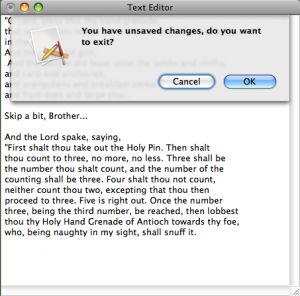
SWT.SHEET support
m7 1 300x296 Eclipse 3.5M7 is out!

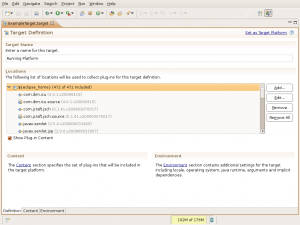
Improved PDE Target Provisioning Support

m7 2 300x284 Eclipse 3.5M7 is out!

pdetarget 300x225 Eclipse 3.5M7 is out!

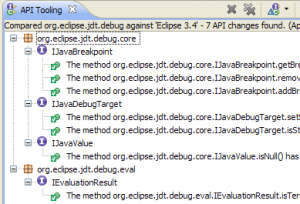
PDE API Tooling Comparisons

m7 31 300x204 Eclipse 3.5M7 is out!

I hope you enjoy the release this year, the Eclipse Platform team put in a lot to close out the year. Thank a committer if you see one icon smile Eclipse 3.5M7 is out!

See you for next year’s release (which we have yet to name)!

Related posts:

7 Responses to “Eclipse 3.5M7 is out!”

  1. kompiro says:

    Good work eclipse comitters!
    (I don’t know the best polite expression!)
    That’s real going to be great!

    Could I use the pictures on “New And Noteworthy” to write about next eclipse release’s cool features on my Japanese blog?
    I think these pictures licensed EPL.
    But I can’t find these pictures actual licensed.

  2. Hi Kompiro, I don’t think it’s a problem to reuse the screenshots.

    It doesn’t make sense for the screenshots to be EPL’d, only code can really be EPL’d.

  3. Gergo says:

    Good stuff, thanks.

    One thing I’m not sure about re: Target platform, though: where can I set additional source code locations?
    That used to be supported in the Target platform preference dialog. Has that gone now or I just missed it?

    If gone, it would be nice to see it return in a more usable form – perhaps some UI to assign source files/folders/URLs/etc.. (not just bundles) when right-clicking on a bundle in the target dialog/editor. Should I raise a bug for this?

  4. Why do you need to set source code locations for your target? This should be done automatically for you.

    Are you working with bundles that don’t have source?

  5. Gergo says:

    > Why do you need to set source code locations for your target?
    I found this ‘additional sources’ support useful (http://help.eclipse.org/help33/index.jsp?topic=/org.eclipse.pde.doc.user/guide/tools/preference_pages/target_platform.htm), even if not exactly user-friendly – it was too fiddly to set up those source dirs correctly, but still lighter than packaging source bundles just to have a quick debug session with 3rd party sources.
    Is it considered useless now? Sorry if I missed something.

    > Are you working with bundles that don’t have source?
    Well, sort of – I have some third party lib ‘pluginified’ without proper source bundles..
    Actually I have the sources for those, separately in plain archives.
    The only way now is to build source bundles for those?

    Anyhow, thanks for the quick answer.

  6. Gergo, the other convention we use in PDE is if there’s a src.zip in the plug-in, we’ll use that as a source location.

    So maybe you can do that as a workaround.

    I’m surprised you used the old UI, it wasn’t as user friendly as I’d hope.

  7. Gergo says:

    Chris,
    Thanks for the hint for the workaround – although I hadn’t any success with it yet.
    I just
    1) added src.zip into the root of that third party bundle (now imported to the workspace) , then
    2) ran a self-hosting Eclipse, in which I
    3) opened Plugins view, found my plugin, “Added it Java Search”, then
    4) expected my classes to be available with sources.. They were not, Classfile editor opens instead of Java..and of course, I’m reminded that ‘container does not allow modifications to source attachments..’ :(
    I don’t see source bundles in the self hosting environment either (even after trying to follow http://wiki.eclipse.org
    /PDEBuild/Individual_Source_Bundles ).

    > convention we use in PDE
    Which PDE plugin do you think is a good example for this? I failed to find any traces of src.zip in those.

    > So maybe you can do that as a workaround.
    Yes, I’m not giving it up – although IMHO it’s far too much work in this case (reimporting/patching/generating source bundles for someone elses plugin) just to have look at the sources occasionally.

    > I’m surprised you used the old UI, it wasn’t as user friendly as I’d hope.
    Well, I had no issues with the UI itself (it was just a simple list of dirs with an ‘Add’ button).
    What was unfriendly is that user had to setup those source dirs in a complicated way, instead of just saying: for this plugin, here are my sources dir/zip/tgz/url etc…

    Fixing it, making it handier would have been nicer than removing it completely.
    I guess I should raise a bug for this regression.

© EclipseSource 2008 - 2011